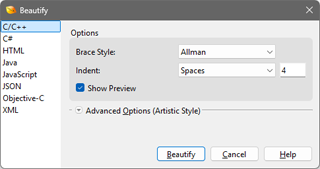
The Beautify tool applies a set of formatting rules to text data to make the data more organized or easier to read. Using Beautify can clean up indentation, brace style, and brackets in code. Formatting can be applied to C, C++, C#, Java, JavaScript and Objective-C using the Artistic Style library, to HTML data using the HTML Tidy library, to JSON data using the RapidJSON library, and to XML data using the pugixml library. Access the Beautify dialog by clicking the 'Format > Beautify' menu option. Select the type of formatting to apply using the list on the left side of the dialog. Click the Beautify button to apply the formatting to the current file if no selection was made, or to the current selection if data was selected. Once a Beautify operation has been performed, clicking the 'Format > Beautify Again' menu option will perform the same beautify operation as was previously applied but the Beautify dialog will not be shown. Beautify Again will be applied to the current selection if a selection is made, or to the entire file is no selection is made.
The Options section of the dialog controls the brace style for code-based formatting, as well as indentation and preview settings. The Brace Style option is discussed in the Artistic Style Options section. If Indent is set to Spaces then each indentation level is created by inserting the number of spaces listed in the field to the right of the drop-down list. If Indent is set to Tabs then a single tab character is inserted for each indentation level and each tab is assumed to cover the number of spaces listed in the field. When using Artistic Style and Tabs is chosen, tabs are inserted for indentation but spaces are used for continuation line alignment. To force tabs to always be inserted, choose the Force Tabs option. When working with HTML data, Indent has three options: Spaces, Auto and None. When set to Spaces, block-level tags are indented with spaces and when set to Auto, the formatter will choose whether to indent depending upon the contents. Using No disables the indent of block-level tags.
By default, a preview of the Beautify operation is displayed in the editor and is updated as options are changed in the Beautify dialog. To turn off this preview, uncheck the Show Preview toggle.
Advanced Options
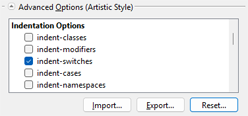
Click the Advanced Options section to view more options specific to each type of beautifier. The current formatting options, included the Options and Advanced Options sections, can be exported to a text file by clicking the Export button and choosing a file. The options can then be loaded from this file by clicking the Import button and choosing a file. Existing ".astylerc" files can also be imported using this button. The Reset button can be used to restore all options for the current beautifier to their original values. The following sections detail the advanced options for Artistic Style, HTML, and XML.
Artistic Style Options (C, C++, C#, Java, JavaScript and Objective-C)
Source code can be beautified using the Artistic Style library (https://astyle.sourceforge.net/). This beautifier can also be used on Binary Templates and 010 Editor Scripts. The following is the documentation of the options for this library:
- Brace Styles
- Allman (BSD/break) - Allman style uses broken braces.
    int Foo(bool isBar)
    {
        if (isBar)
        {
            bar();
            return 1;
        }
        else
            return 0;
    }
- Java (attach) - Java style uses attached braces.
    int Foo(bool isBar) {
        if (isBar) {
            bar();
            return 1;
        } else
            return 0;
    }
- Kernighan & Ritchie - Kernighan & Ritchie style uses linux braces. Opening braces are broken from namespaces, classes, and function definitions. The braces are attached to everything else, including arrays, structs, enums, and statements within a function.
    int Foo(bool isBar)
    {
        if (isBar) {
            bar();
            return 1;
        } else
            return 0;
    }
- Stroustrup - Stroustrup style uses linux braces. Opening braces are broken from function definitions only. The opening braces are attached to everything else, including namespaces, classes, arrays, structs, enums, and statements within a function. The closing headers are broken from closing braces (e.g. --break-closing-headers). This style frequently is used with attach-closing-while, tabbed indents, and an indent of 5 spaces.
    int Foo(bool isBar)
    {
        if (isBar) {
            bar();
            return 1;
        }
        else
            return 0;
    }
- Whitesmith - Whitesmith style uses broken, indented braces. Switch blocks and class blocks are indented to prevent a 'hanging indent' with the following case statements and C++ class modifiers (public, private, protected).
    int Foo(bool isBar)
        {
        if (isBar)
            {
            bar();
            return 1;
            }
        else
            return 0;
        }
- VTK - VTK (Visualization Toolkit) style uses broken, indented braces, except for the opening brace of classes, arrays, structs, enums, and function definitions. Switch blocks are indented to prevent a 'hanging indent' with following case statements.
    int Foo(bool isBar)
    {
        if (isBar)
            {
            bar();
            return 1;
            }
        else
            return 0;
    }
- Ratliff - Ratliff style uses attached, indented braces. Switch blocks and class blocks are indented to prevent a 'hanging indent' with following case statements and C++ class modifiers (public, private, protected). int Foo(bool isBar) {
        if (isBar) {
            bar();
            return 1;
            }
        else
            return 0;
        }
- GNU - GNU style uses broken braces. Extra indentation is added to blocks within a function only. The entire block is indented, not just the brace. This style frequently is used with an indent of 2 spaces.
    int Foo(bool isBar)
    {
        if (isBar)
            {
                bar();
                return 1;
            }
        else
            return 0;
    }
- Linux - Linux style uses linux braces. Opening braces are broken from namespace, class, and function definitions. The braces are attached to everything else, including arrays, structs, enums, and statements within a function. The minimum conditional indent is one-half indent. If you want a different minimum conditional indent, use the K&R style instead. This style works best with a large indent. It frequently is used with an indent of 8 spaces.
Also known as Kernel Normal Form (KNF) style, this is the style used in the Linux BSD kernel.
    int Foo(bool isBar)
    {
            if (isFoo) {
                    bar();
                    return 1;
            } else
                    return 0;
    }
- Horstmann -
Horstmann style uses broken braces and run-in statements. Switches are indented to allow a run-in to the opening switch block. This style frequently is used with an indent of 3 spaces.
    int Foo(bool isBar)
    {   if (isBar)
        {   bar();
            return 1;
        }
        else
            return 0;
    }
- One True Brace Style - "One True Brace Style" uses linux braces and adds braces to unbraced one line conditional statements. Opening braces are broken from namespaces, classes, and function definitions. The braces are attached to everything else, including arrays, structs, enums, and statements within a function.
In the following example, braces have been added to the "return 0;" statement. The option --add-one-line-braces can also be used with this style.
    int Foo(bool isBar)
    {
        if (isFoo) {
            bar();
            return 1;
        } else {
            return 0;
        }
    }
- Google - Google style uses attached braces and indented class access modifiers. See the indent-modifiers option for an example of the indented modifiers format. This is not actually a unique brace style, but is Java style with a non-brace variation. This style frequently is used with an indent of 2 spaces.
    int Foo(bool isBar) {
        if (isBar) {
            bar();
            return 1;
        } else
            return 0;
    }
- Mozilla - Mozilla style uses linux braces. Opening braces are broken from classes, structs, enums, and function definitions. The braces are attached to everything else, including namespaces, arrays, and statements within a function. This style frequently is used with an indent of 2 spaces and --break-return-type.
    int Foo(bool isBar)
    {
        if (isBar) {
            bar();
            return 1;
        } else
            return 0;
    }
- WebKit - WebKit style uses linux braces. Opening braces are broken from function definitions only. The opening braces are attached to everything else, including namespaces, classes, arrays, structs, enums, and statements within a function. This style frequently is used with attach-closing-while, and an indent of 4 spaces.
    int Foo(bool isBar)
    {
        if (isBar) {
            bar();
            return 1;
        } else
            return 0;
    }
- Pico - Pico style uses broken braces and run-in statements with attached closing braces. The closing brace is attached to the last line in the block. Switches are indented to allow a run-in to the opening switch block. The style implies keep-one-line-blocks and keep-one-line-statements. If add-braces is used they will be added as one-line braces. This style frequently is used with an indent of 2 spaces.
    int Foo(bool isBar)
    {   if (isBar)
        {   bar();
            return 1; }
        else
            return 0; }
- Lisp - Lisp style uses attached opening and closing braces. The closing brace is attached to the last line in the block. The style implies keep-one-line-statements, but NOT keep-one-line-blocks. This style does not support one-line braces. If add-one-line-braces is used they will be added as multiple-line braces.
int Foo(bool isBar) {
      if (isBar) {
          bar();
          return 1; }
      else
          return 0; }
- No Change - Braces are not modified.
- Brace Modify Options
- attach-namespaces - Attach braces to a namespace statement. This is done regardless of the brace style being used. It will also attach braces to CORBA IDL module statements. the brace is always attached to a namespace statement:
    namespace FooName {
    ...
    }
- attach-classes - Attach braces to a class statement. This is done regardless of the brace style being used. The brace is always attached to a class statement:
    class FooClass {
    ...
    };
- attach-inlines - Attach braces to class and struct inline function definitions. This option has precedence for all styles except Horstmann and Pico (run-in styles). It is effective for C++ files only. All braces are attached to class and struct inline method definitions:
    class FooClass
    {
        void Foo() {
        ...
        }
    };
- attach-extern-c - Attach braces to a braced extern "C" statement. This is done regardless of the brace style being used. This option is effective for C++ files only. An extern "C" statement that is part of a function definition is formatted according to the requested brace style. Braced extern "C" statements are unaffected by the brace style and this option is the only way to change them. This option attaches braces to a braced extern "C" statement:
    #ifdef __cplusplus
    extern "C" {
    #endif
but function definitions are formatted according to the requested brace style:
    extern "C" EXPORT void STDCALL Foo()
    {}
- attach-closing-while - Attach the closing 'while' of a 'do-while' statement to the closing brace. This has precedence over both the brace style and the break closing braces option.
    do
    {
        bar();
        ++x;
    }
    while x == 1;
becomes:
    do
    {
        bar();
        ++x;
    } while x == 1;
- Indentation Options
- indent-classes - Indent 'class' and 'struct' blocks so that the entire block is indented. The struct blocks are indented only if an access modifier, 'public:', 'protected:' or 'private:', is declared somewhere in the struct. This option is effective for C++ files only.
    class Foo
    {
    public:
        Foo();
        virtual ~Foo();
    };
becomes:
    class Foo
    {
        public:
            Foo();
            virtual ~Foo();
    };
- indent-modifiers - Indent 'class ' and 'struct' access modifiers, 'public:', 'protected:' and 'private:', one half indent. The rest of the class is not indented. This option is effective for C++ files only. If used with indent-classes this option will be ignored.
    class Foo
    {
    public:
        Foo();
        virtual ~Foo();
    };
becomes:
    class Foo
    {
      public:
        Foo();
        virtual ~Foo();
    };
- indent-switches - Indent 'switch' blocks so that the 'case X:' statements are indented in the switch block. The entire case block is indented.
    switch (foo)
    {
    case 1:
        a += 1;
        break;

    case 2:
    {
        a += 2;
        break;
    }
    }
becomes:
    switch (foo)
    {
        case 1:
            a += 1;
            break;

        case 2:
        {
            a += 2;
            break;
        }
    }
- indent-cases - Indent 'case X:' blocks from the 'case X:' headers. Case statements not enclosed in blocks are NOT indented.
    switch (foo)
    {
        case 1:
            a += 1;
            break;

        case 2:
        {
            a += 2;
            break;
        }
    }
becomes:
    switch (foo)
    {
        case 1:
            a += 1;
            break;

        case 2:
            {
                a += 2;
                break;
            }
    }
- indent-namespaces - Add extra indentation to namespace blocks. This option has no effect on Java files. It will also indent CORBA IDL module statements.
    namespace foospace
    {
    class Foo
    {
        public:
            Foo();
            virtual ~Foo();
    };
    }
becomes:
    namespace foospace
    {
        class Foo
        {
            public:
                Foo();
                virtual ~Foo();
        };
    }
- indent-after-parens - Indent, instead of align, continuation lines following lines that contain an opening paren '(' or an assignment '='. This includes function definitions and declarations and return statements. The indentation can be modified by using the following indent-continuation option. This option may be preferred for editors displaying proportional fonts.
    void Foo(bool bar1,
             bool bar2)
    {
        isLongFunction(bar1,
                       bar2);

        isLongVariable = foo1
                         || foo2;
    }
becomes:
    void Foo(bool bar1,
        bool bar2)
    {
        isLongFunction(bar1,
            bar2);

        isLongVariable = foo1
            || foo2;
    }
- indent-continuation - Set the continuation indent for a line that ends with an opening paren '(' or an assignment '='. This includes function definitions and declarations. It will also modify the previous indent-after-paren option. The value indicates a number of indents. The valid values are the integer values from 0 thru 4. If this option is not used, the default value of 1 is used.
    isLongVariable =
        foo1 ||
        foo2;

    isLongFunction(
        bar1,
        bar2);
becomes (with indent-continuation=3):
    isLongVariable =
                foo1 ||
                foo2;

    isLongFunction(
                bar1,
                bar2);
- indent-labels - Add extra indentation to labels so they appear 1 indent less than the current indentation, rather than being flushed to the left (the default).
    void Foo() {
        while (isFoo) {
            if (isFoo)
                goto error;
            ...
    error:
            ...
            }
    }
becomes (with indented 'error:'):
    void Foo() {
        while (isFoo) {
            if (isFoo)
                goto error;
            ...
        error:
            ...
            }
    }
- indent-preproc-block - Indent preprocessor blocks at brace level zero and immediately within a namespace. There are restrictions on what will be indented. Blocks within methods, classes, arrays, etc., will not be indented. Blocks containing braces or multi-line define statements will not be indented. Without this option the preprocessor block is not indented.
    #ifdef _WIN32
    #include
    #ifndef NO_EXPORT
    #define EXPORT
    #endif
    #endif
becomes:
    #ifdef _WIN32
        #include
        #ifndef NO_EXPORT
            #define EXPORT
        #endif
    #endif
- indent-preproc-define - Indent multi-line preprocessor definitions ending with a backslash. Should be used with --convert-tabs for proper results. Does a pretty good job, but cannot perform miracles in obfuscated preprocessor definitions. Without this option the preprocessor statements remain unchanged.
    #define Is_Bar(arg,a,b) \
    (Is_Foo((arg), (a)) \
    || Is_Foo((arg), (b)))
becomes:
    #define Is_Bar(arg,a,b) \
        (Is_Foo((arg), (a)) \
         || Is_Foo((arg), (b)))
- indent-preproc-cond - Indent preprocessor conditional statements to the same level as the source code.
            isFoo = true;
    #ifdef UNICODE
            text = wideBuff;
    #else
            text = buff;
    #endif
becomes:
            isFoo = true;
            #ifdef UNICODE
            text = wideBuff;
            #else
            text = buff;
            #endif
- indent-col1-comments - Indent C++ comments beginning in column one. By default C++ comments beginning in column one are assumed to be commented-out code and not indented. This option will allow the comments to be indented with the code.
    void Foo()
    {
    // comment
        if (isFoo)
            bar();
    }
becomes:
    void Foo()
    {
        // comment
        if (isFoo)
            bar();
    }
- min-conditional-indent - Set the minimal indent that is added when a header is built of multiple lines. This indent helps to easily separate the header from the command statements that follow. The value for # indicates a number of indents and is a minimum value. The indent may be greater to align with the data on the previous line. The valid values are: 0 - no minimal indent. The lines will be aligned with the paren on the preceding line. 1 - indent at least one additional indent. 2 - indent at least two additional indents. 3 - indent at least one-half an additional indent. This is intended for large indents (e.g. 8). The default value is 2, two additional indents.
    // default setting makes this non-braced code clear
    if (a < b
            || c > d)
        foo++;

    // but creates an exaggerated indent in this braced code
    if (a < b
            || c > d)
    {
        foo++;
    }
becomes (when setting --min-conditional-indent=0):
    // setting makes this non-braced code less clear
    if (a < b
        || c > d)
        foo++;

    // but makes this braced code clearer
    if (a < b
        || c > d)
    {
        foo++;
    }
- max-continuation-indent - Set the maximum of # spaces to indent a continuation line. The # indicates a number of columns and must not be less than 40 or greater than 120. If no value is set, the default value of 40 will be used. This option will prevent continuation lines from extending too far to the right. Setting a larger value will allow the code to be extended further to the right.
    fooArray[] = { red,
             green,
             blue };

    fooFunction(barArg1,
             barArg2,
             barArg3);
becomes (with larger value):
    fooArray[] = { red,
                   green,
                   blue };

    fooFunction(barArg1,
                barArg2,
                barArg3);
- indent-lambda - This option improves indentation of C++ lambda functions. As it currently does not work well with complex lambda function bodies, this feature is not enabled by default.
    void abssort (float* x, unsigned n)
    {
        std::sort (x, x + n,
        [] (float a, float b) {
            return (std::abs (a) < std::abs (b));
        }
                  );
    }
becomes:
    void abssort (float* x, unsigned n)
    {
        std::sort (x, x + n,
                    [] (float a, float b) {
                        return (std::abs (a) < std::abs (b));
                    }
                   );
    }
- Padding Options
- break-blocks - (|all) Pad empty lines around header blocks (e.g. 'if', 'for', 'while'...).
    isFoo = true;
    if (isFoo) {
        bar();
    } else {
        anotherBar();
    }
    isBar = false;
becomes:
    isFoo = true;

    if (isFoo) {
        bar();
    } else {
        anotherBar();
    }

    isBar = false;
When using "all", pad empty lines around header blocks (e.g. 'if', 'for', 'while'...). Treat closing header blocks (e.g. 'else', 'catch'), structs and functions as stand-alone blocks.
    isFoo = true;
    if (isFoo) {
        bar();
    } else {
        anotherBar();
    }
    isBar = false;
becomes:
    isFoo = true;

    if (isFoo) {
        bar();

    } else {
        anotherBar();
    }

    isBar = false;
- pad-oper - Insert space padding around operators. This will also pad commas. Any end of line comments will remain in the original column, if possible. Note that there is no option to unpad. Once padded, they stay padded.
    if (foo==2)
        a=bar((b-c)*a,d--);
becomes:
    if (foo == 2)
        a = bar((b - c) * a, d--);
- pad-comma - Insert space padding after commas. This is not needed if pad-oper is used. Any end of line comments will remain in the original column, if possible. Note that there is no option to unpad. Once padded, they stay padded.
    if (isFoo(a,b))
        bar(a,b);
becomes:
    if (isFoo(a, b))
        bar(a, b);
- pad-include - (|none) Insert space padding after include directives and removes superfluous whitespace.
    #include<stdio>
    #include   <iostream>
becomes:
    #include <stdio>
    #include <iostream>
For pad-include=none, remove space padding after include directives.
    #include<stdio>
    #include   <iostream>
becomes:
    #include<stdio>
    #include<iostream>
- pad-negation - (|before) Insert space padding after negations.
    if (!isFoo(a,b))
        bar(a,b);
becomes:
    if (! isFoo(a, b))
        bar(a, b);
For pad-negation=before, insert space padding also before negations.
    if (!isFoo(a,b))
        bar(a,b);
becomes:
    if ( ! isFoo(a, b))
        bar(a, b);
- pad-paren - (|in|out|none) Insert space padding around parens on both the outside and the inside. Any end of line comments will remain in the original column, if possible.
    if (isFoo((a+2), b))
        bar(a, b);
becomes:
    if ( isFoo ( ( a+2 ), b ) )
        bar ( a, b );
For pad-paren=in, insert space padding around paren on the inside only. Any end of line comments will remain in the original column, if possible. This can be used with pad-paren=none below to remove unwanted spaces.
    if (isFoo((a+2), b))
        bar(a, b);
becomes:
    if ( isFoo( ( a+2 ), b ) )
        bar( a, b );
For pad-paren=out, insert space padding around parens on the outside only. Parens that are empty will not be padded. Any end of line comments will remain in the original column, if possible. This can be used with pad-paren=none below to remove unwanted spaces.
    if (isFoo((a+2), b))
        bar(a, b);
becomes:
    if (isFoo ( (a+2), b) )
        bar (a, b);
For pad-paren=none, remove extra space padding around parens on the inside and outside. Any end of line comments will remain in the original column, if possible. This option can be used in combination with the paren padding options pad-paren, pad-paren=out, pad-paren=in, and pad-header above. Only padding that has not been requested by other options will be removed.
For example, if a source has parens padded on both the inside and outside, and you want inside only. You need to use pad-paren=none to remove the outside padding, and pad-paren=in to retain the inside padding. Using only pad-paren=in would not remove the outside padding.
    if ( isFoo( ( a+2 ), b ) )
        bar ( a, b );
becomes (with no padding option requested):
    if(isFoo((a+2), b))
        bar(a, b);
- pad-first-paren-out - Insert space padding around the first paren in a series on the outside only. Parens that are empty will not be padded. Any end of line comments will remain in the original column, if possible. This can be used with pad-paren=none below to remove unwanted spaces. If used with pad-paren or pad-paren=out, this option will be ignored. If used with pad-paren=in, the result will be the pad-paren.
    if (isFoo((a+2), b))
        bar(a, b);
becomes:
    if (isFoo ((a+2), b))
        bar (a, b);
- pad-header - Insert space padding between a header (e.g. 'if', 'for', 'while'...) and the following paren. Any end of line comments will remain in the original column, if possible. This can be used with pad-paren=none to remove unwanted spaces.
    if(isFoo((a+2), b))
        bar(a, b);
becomes:
    if (isFoo((a+2), b))
        bar(a, b);
- pad-empty-paren - Apply padding to empty pairs of parentheses; combine with other parentheses padding options.
    if (isFoo())
        bar(a, b);
becomes:
    if ( isFoo () )
        bar( a, b );
- pad-brackets - (|in|out|none) Insert space padding around square brackets on both the outside and the inside.
a = b[a[1]];
becomes:
a = b [ a [ 1 ] ];
For pad-brackets=in, insert space padding around square brackets the inside only.
a = b[a[1]];
becomes:
a = b[ a[ 1 ] ];
For pad-brackets=out, insert space padding around square brackets the outside only.
a = b[a[1]];
becomes:
a = b [a [1]];
For pad-brackets=none, remove padding around square brackets on both the outside and the inside.
a = b [ a [ 1 ] ];
becomes:
a = b[a[1]];
- delete-empty-lines - Eliminates unnecessary empty lines from within functions and methods. Empty lines outside of nested functions and methods, as well as lines specified by break-block options, are kept intact.
    void Foo()
    {

        foo1 = 1;

        foo2 = 2;

    }
becomes:
    void Foo()
    {
        foo1 = 1;
        foo2 = 2;
    }
- fill-empty-lines - Fill empty lines with the white space of the previous line.
- squeeze-lines - Remove superfluous empty lines exceeding the given number.
    void Foo()
    {
        foo1 = 1;
    }


    void Foo2()
    {
        foo1 = 1;
    }
becomes:
    void Foo()
    {
        foo1 = 1;
    }


    void Foo2()
    {
        foo1 = 1;
    }
- squeeze-ws - Remove superfluous whitespace
    void       Foo    ()
    {
        foo1   =   1;
    }
becomes:
    void Foo ()
    {
        foo1 = 1;
    }
- align-pointer - (type|middle|name) Attach a pointer or reference operator (*, &, or ^) to either the variable type (left) or variable name (right), or place it between the type and name (middle). The spacing between the type and name will be preserved, if possible. This option is for C/C++, C++/CLI, and C# files. To format references separately, use the following align-reference option.
    char* foo1;
    char & foo2;
    string ^s1;
becomes (with align-pointer=type):
    char* foo1;
    char& foo2;
    string^ s1;
    char* foo1;
    char & foo2;
    string ^s1;
becomes (with align-pointer=middle):
    char * foo1;
    char & foo2;
    string ^ s1;
    char* foo1;
    char & foo2;
    string ^s1;
becomes (with align-pointer=name):
    char *foo1;
    char &foo2;
    string ^s1;
- align-reference - (none|type|middle|name) This option will align references separate from pointers. Pointers are not changed by this option. If pointers and references are to be aligned the same, use the previous align-pointer option. The option align-reference=none will not change the reference alignment. The other options are the same as for align-pointer. This option is for C/C++, C++/CLI, and C# files.
char &foo1;
becomes (with align-reference=type):
    char& foo1;
    char& foo2;
becomes (with align-reference=middle):
    char & foo2;
    char& foo3;
becomes (with align-reference=name):
char &foo3;
- Formatting Options
- break-closing-braces - When used with --style=java, --style=kr, --style=stroustrup, --style=linux, or --style=1tbs, this breaks closing headers (e.g. 'else', 'catch', ...) from their immediately preceding closing braces. Closing header braces are always broken with the other styles.
    void Foo(bool isFoo) {
        if (isFoo) {
            bar();
        } else {
            anotherBar();
        }
    }
becomes (a broken 'else'):
    void Foo(bool isFoo) {
        if (isFoo) {
            bar();
        }
        else {
            anotherBar();
        }
    }
- break-elseifs - Break "else if" header combinations into separate lines. This option has no effect if keep-one-line-statements is used, the "else if" statements will remain as they are.
If this option is NOT used, "else if" header combinations will be placed on a single line.
    if (isFoo) {
        bar();
    }
    else if (isFoo1()) {
        bar1();
    }
    else if (isFoo2()) {
        bar2();
    }
becomes:
    if (isFoo) {
        bar();
    }
    else
        if (isFoo1()) {
            bar1();
        }
        else
            if (isFoo2()) {
                bar2();
            }
- break-one-line-headers - Break one line headers (e.g. 'if', 'while', 'else', ...) from a statement residing on the same line. If the statement is enclosed in braces, the braces will be formatted according to the requested brace style. A multi-statement line will NOT be broken if keep-one-line-statements is requested. One line blocks will NOT be broken if keep-one-line-blocks is requested and the header is enclosed in the block.
    void Foo(bool isFoo)
    {
        if (isFoo1) bar1();

        if (isFoo2) { bar2(); }
    }
becomes:
    void Foo(bool isFoo)
    {
        if (isFoo1)
            bar1();

        if (isFoo2) {
            bar2();
        }
    }
- add-braces - Add braces to unbraced one line conditional statements (e.g. 'if', 'for', 'while'...). The statement must be on a single line. The braces will be added according to the requested brace style. If no style is requested the braces will be attached. Braces will NOT be added to a multi-statement line if keep-one-line-statements is requested. Braces will NOT be added to a one line block if keep-one-line-blocks is requested. If used with --add-one-line-braces, the result will be one line braces.
    if (isFoo)
        isFoo = false;
becomes:
    if (isFoo) {
        isFoo = false;
    }
- add-one-line-braces - Add one line braces to unbraced one line conditional statements (e.g. 'if', 'for', 'while'...). The statement must be on a single line. The option implies --keep-one-line-blocks and will not break the one line blocks.
    if (isFoo)
        isFoo = false;
becomes:
    if (isFoo)
        { isFoo = false; }
- remove-braces - Remove braces from conditional statements (e.g. 'if', 'for', 'while'...). The statement must be a single statement on a single line. If --add-braces or --add-one-line-braces is also used the result will be to add braces. Braces will not be removed from "One True Brace Style", --style=1tbs.
    if (isFoo)
    {
        isFoo = false;
    }
becomes:
    if (isFoo)
        isFoo = false;
- break-return-type - Break the return type from the function name. The two options are for the function definitions (-xB), and the function declarations or signatures (-xD). If used with attach-return-type, the result will be to break the return type. This option has no effect on Objective-C functions.
    void
    Foo(bool isFoo);
becomes:
    void
    Foo(bool isFoo);
- attach-return-type - Attach the return type to the function name. The two options are for the function definitions (-xf), and the function declarations or signatures (-xh). They are intended to undo the break-return-type options. If used with --break-return-type, the result will be to break the return type. This option has no effect on Objective-C functions.
void
Foo(bool isFoo);
becomes:
void Foo(bool isFoo);
- keep-one-line-blocks - Don't break one-line blocks.
    if (isFoo)
    { isFoo = false; cout << isFoo << endl; }
remains unchanged.
- keep-one-line-statements - Don't break complex statements and multiple statements residing on a single line.
    if (isFoo)
    {
        isFoo = false; cout << isFoo << endl;
    }
remains unchanged.
- convert-tabs - Converts tabs into spaces in the non-indentation part of the line. The number of spaces inserted will maintain the spacing of the tab. The current setting for spaces per tab is used. It may not produce the expected results if convert-tabs is used when changing spaces per tab. Tabs are not replaced within quotes.
- close-templates - Closes whitespace between the ending angle brackets of template definitions. Closing the ending angle brackets is now allowed by the C++11 standard. Be sure your compiler supports this before making the changes.
Stack< int, List< int > > stack1;
becomes:
Stack< int, List< int >> stack1;
- remove-comment-prefix - Remove the preceding '*' in a multi-line comment that begins a line. A trailing '*', if present, is also removed. Text that is less than one indent is indented to one indent. Text greater than one indent is not changed. Multi-line comments that begin a line, but without the preceding '*', are indented to one indent for consistency. This can slightly modify the indentation of commented out blocks of code. Lines containing all '*' are left unchanged. Extra spacing is removed from the comment close '*/'.
    /*
     * comment line 1
     * comment line 2
     */
becomes:
    /*
        comment line 1
        comment line 2
    */
- max-code-length
- break-after-logical - The option max-code-length will break a line if the code exceeds # characters. The valid values are 50 thru 200. Lines without logical conditionals will break on a logical conditional (||, &&, ...), comma, paren, semicolon, or space.
Some code will not be broken, such as comments, quotes, and arrays. If used with keep-one-line-blocks or add-one-line-braces the blocks will NOT be broken. If used with keep-one-line-statements the statements will be broken at a semicolon if the line goes over the maximum length. If there is no available break point within the max code length, the line will be broken at the first available break point after the max code length.
By default logical conditionals will be placed first in the new line. The option break-after-logical will cause the logical conditionals to be placed last on the previous line. This option has no effect without max-code-length.
- Objective-C Options
- pad-method-prefix - (|none) Insert space padding after the '-' or '+' Objective-C method prefix. This will add exactly one space. Any additional spaces will be deleted.
    -(void)foo1;
    -    (void)foo2;
becomes:
    - (void)foo1;
    - (void)foo2;
For pad-method-prefix=none, remove all space padding after the '-' or '+' Objective-C method prefix. This option will be ignored if used with pad-method-prefix. This option takes precedence over the pad paren outside option.
    - (void) foo1;
    -     (void) foo2;
becomes:
    -(void) foo1;
    -(void) foo2;
For pad-method-prefix=none, remove all space padding after the '-' or '+' Objective-C method prefix. This option will be ignored if used with pad-method-prefix. This option takes precedence over the pad paren outside option.
    - (void) foo1;
    -     (void) foo2;
becomes:
    -(void) foo1;
    -(void) foo2;
- pad-return-type - (|none) Insert space padding after the Objective-C return type. This will add exactly one space. Any additional spaces will be deleted.
    -(void)foo1;
    -(void)   foo2;
becomes:
    -(void) foo1;
    -(void) foo2;
For pad-return-type=none, remove all space padding after the Objective-C return type. This option will be ignored if used with pad-return-type. This option takes precedence over the pad paren outside option.
    -(void) foo1;
    -(void)    foo2;
becomes:
    -(void)foo1;
    -(void)foo2;
- pad-param-type - (|none) Insert space padding around an Objective-C parameter type. This will add exactly one space. Any additional spaces will be deleted. This has precedence over the pad method colon option and will always cause space padding after a method colon.
    -(void)foo1:(bool)barArg1;
    -(void)foo2:    (bool)   barArg2;
becomes:
    -(void)foo1: (bool) barArg1;
    -(void)foo2: (bool) barArg2;
For pad-param-type=none, remove all space padding around an Objective-C parameter type. This option takes precedence over the pad paren outside option. The pad method colon option has precedence over the opening paren. The closing paren will always be unpadded.
    -(void)foo1: (bool)    barArg1;
    -(void)foo2:     (bool)    barArg2;
becomes (with an unpadded method colon):
    -(void)foo1:(bool)barArg1;
    -(void)foo2:(bool)barArg2;
becomes (with a padded method colon after):
    -(void)foo1: (bool)barArg1;
    -(void)foo2: (bool)barArg2;
- align-method-colon - Align the colons in Objective-C method declarations and method calls. If this option is not declared, method definitions will be indented uniformly, and method calls will align with the first keyword.
    -(void)longKeyword: (ID)theArg1
             keyword: (int)theArg2
           error: (NSError*)theError
    {
        [myObj longKeyword: arg1
         keyword: arg2
         error: arg3];
    }
becomes (with no option declared):
    -(void)longKeyword: (ID)theArg1
        keyword: (int)theArg2
        error: (NSError*)theError
    {
        [myObj longKeyword: arg1
               keyword: arg2
               error: arg3];
    }
becomes (with align-method-colon):
    -(void)longKeyword: (ID)theArg1
               keyword: (int)theArg2
                 error: (NSError*)theError
    {
        [myObj longKeyword: arg1
                   keyword: arg2
                     error: arg3];
    }
- pad-method-colon - (none|all|after|before) Add or remove space padding before or after the colons in an Objective-C method call. These options will pad exactly one space. Any additional spaces will be deleted. The space padding after the method colon can be overridden by pad-param-type.
With pad-method-colon=none:
-(void)insertKey:(id)key;
with pad-method-colon=all:
-(void)insertKey : (id)key;
with pad-method-colon=after:
-(void)insertKey: (id)key;
with pad-method-colon=before:
-(void)insertKey :(id)key;
HTML Options
HTML beautify is performed using the HTML Tidy library (https://www.html-tidy.org/). The following is the documentation of the options for this library:
- Cleanup Options
- bare - This option specifies if Tidy should replace smart quotes and em dashes with ASCII, and output spaces rather than non-breaking spaces, where they exist in the input.
- clean - This option specifies if Tidy should perform cleaning of some legacy presentational tags (currently <i>, <b>, <center> when enclosed within appropriate inline tags, and <font>). If set to yes, then the legacy tags will be replaced with CSS <style> tags and structural markup as appropriate.
- drop-empty-elements - This option specifies if Tidy should discard empty elements.
- drop-empty-paras - This option specifies if Tidy should discard empty paragraphs.
- drop-proprietary-attributes - This option specifies if Tidy should strip out proprietary attributes, such as Microsoft data binding attributes. Additionally attributes that aren't permitted in the output version of HTML will be dropped if used with strict-tags-attributes.
- logical-emphasis - This option specifies if Tidy should replace any occurrence of <i> with <em> and any occurrence of <b> with <strong>. Any attributes are preserved unchanged.
This option can be set independently of the clean option.
- merge-divs - (yes|auto) This option can be used to modify the behavior of clean when set to yes.This option specifies if Tidy should merge nested <div> such as <div><div>...</div></div>. If set to auto the attributes of the inner <div> are moved to the outer one. Nested <div> with id attributes are not merged.If set to yes the attributes of the inner <div> are discarded with the exception of class and style.
- merge-spans - (yes|auto) This option can be used to modify the behavior of clean when set to yes.
This option specifies if Tidy should merge nested <span> such as <span><span>...</span></span>.
The algorithm is identical to the one used by merge-divs.
- word-2000 - This option specifies if Tidy should go to great pains to strip out all the surplus stuff Microsoft Word 2000 inserts when you save Word documents as "Web pages". It doesn't handle embedded images or VML. You should consider saving using Word's Save As..., and choosing Web Page, Filtered.
- Entities Options
- ascii-chars - Can be used to modify behavior of the clean option when checked.
If set to yes when using clean, &emdash;, ”, and other named character entities are downgraded to their closest ASCII equivalents.
- ncr - This option specifies if Tidy should allow numeric character references.
- numeric-entities - This option specifies if Tidy should output entities other than the built-in HTML entities (&, <, >, and ") in the numeric rather than the named entity form.
Only entities compatible with the DOCTYPE declaration generated are used.
Entities that can be represented in the output encoding are translated correspondingly.
- preserve-entities - This option specifies if Tidy should preserve well-formed entities as found in the input.
- quote-ampersand - This option specifies if Tidy should output unadorned & characters as &, in legacy doctypes only.
- quote-marks - This option specifies if Tidy should output " characters as " as is preferred by some editing environments.The apostrophe character ' is written out as ' since many web browsers don't yet support '.
- quote-nbsp - This option specifies if Tidy should output non-breaking space characters as entities, rather than as the Unicode character value 160 (decimal).
- Repair Options
- alt-text - This option specifies the default alt=text Tidy uses for <img> attributes when the alt= attribute is missing. Use with care, as it is your responsibility to make your documents accessible to people who cannot see the images.
- anchor-as-name - This option controls the deletion or addition of the name attribute in elements where it can serve as anchor. If checked a name attribute, if not already existing, is added along an existing id attribute if the DTD allows it. If unchecked any existing name attribute is removed if an id attribute exists or has been added.
- assume-xml-procins - This option specifies if Tidy should change the parsing of processing instructions to require ?> as the terminator rather than >.This option is automatically set if the input is in XML.
- coerce-endtags - This option specifies if Tidy should coerce a start tag into an end tag in cases where it looks like an end tag was probably intended; for example, given "<span>foo <b>bar<b> baz</span>" Tidy will output "<span>foo <b>bar</b> baz</span>".
- css-prefix - This option specifies the prefix that Tidy uses for styles rules.
By default, c will be used.
- custom-tags - (blocklevel|empty|inline|pre) This option enables the use of tags for autonomous custom elements, e.g. <flag-icon> with Tidy. Custom tags are disabled if this value is unchecked. Other settings - blocklevel, empty, inline, and pre will treat all detected custom tags accordingly. The use of new-blocklevel-tags, new-empty-tags, new-inline-tags, or new-pre-tags will override the treatment of custom tags by this configuration option. This may be useful if you have different types of custom tags. When enabled these tags are determined during the processing of your document using opening tags; matching closing tags will be recognized accordingly, and unknown closing tags will be discarded.
- enclose-block-text - This option specifies if Tidy should insert a <p> element to enclose any text it finds in any element that allows mixed content for HTML transitional but not HTML strict.
- enclose-text - This option specifies if Tidy should enclose any text it finds in the body element within a <p> element. This is useful when you want to take existing HTML and use it with a style sheet.
- escape-scripts - This option causes items that look like closing tags, like </g to be escaped to <\/g. Set this option to no if you do not want this.
- fix-backslash - This option specifies if Tidy should replace backslash characters \ in URLs with forward slashes /.
- fix-bad-comments - (yes|auto) This option specifies if Tidy should replace unexpected hyphens with = characters when it comes across adjacent hyphens. The default is auto will which will act as unchecked for HTML5 document types, and yes for all other document types. HTML has abandoned SGML comment syntax, and allows adjacent hyphens for all versions of HTML, although XML and XHTML do not. If you plan to support older browsers that require SGML comment syntax, then consider setting this value to yes.
- fix-style-tags - This option specifies if Tidy should move all style tags to the head of the document.
- fix-uri - This option specifies if Tidy should check attribute values that carry URIs for illegal characters and if such are found, escape them as HTML4 recommends.
- literal-attributes - This option specifies how Tidy deals with whitespace characters within attribute values. If the value is unchecked Tidy normalizes attribute values by replacing any newline or tab with a single space, and further by replacing any contiguous whitespace with a single space. To force Tidy to preserve the original, literal values of all attributes and ensure that whitespace within attribute values is passed through unchanged, set this option to checked.
- lower-literals - This option specifies if Tidy should convert the value of an attribute that takes a list of predefined values to lower case. This is required for XHTML documents.
- repeated-attributes - (keep-last|keep-first) This option specifies if Tidy should keep the first or last attribute, if an attribute is repeated, e.g. has two align attributes.
- skip-nested - This option specifies that Tidy should skip nested tags when parsing script and style data.
- strict-tags-attributes - This options ensures that tags and attributes are applicable for the version of HTML that Tidy outputs. When checked and the output document type is a strict doctype, then Tidy will report errors. If the output document type is a loose or transitional doctype, then Tidy will report warnings. Additionally if drop-proprietary-attributes is enabled, then not applicable attributes will be dropped, too.
When unchecked, these checks are not performed.
- uppercase-attributes - (yes|preserve) - This option specifies if Tidy should output attribute names in upper case. When set to unchecked, attribute names will be written in lower case. Specifying yes will output attribute names in upper case, and preserve can used to leave attribute names untouched.
- uppercase-tags - This option specifies if Tidy should output tag names in upper case. The default is unchecked which results in lower case tag names.
- Transformation Options
- decorate-inferred-ul - This option specifies if Tidy should decorate inferred <ul> elements with some CSS markup to avoid indentation to the right.
- escape-cdata - This option specifies if Tidy should convert <![CDATA[]]> sections to normal text.
- hide-comments - This option specifies if Tidy should not print out comments.
- join-classes - This option specifies if Tidy should combine class names to generate a single, new class name if multiple class assignments are detected on an element.
- join-styles - This option specifies if Tidy should combine styles to generate a single, new style if multiple style values are detected on an element.
- merge-emphasis - This option specifies if Tidy should merge nested <b> and <i> elements; for example, for the case "<b class="rtop-2">foo <b class="r2-2">bar</b> baz</b>",
Tidy will output "<b class="rtop-2">foo bar baz</b>".
- replace-color - This option specifies if Tidy should replace numeric values in color attributes with HTML/XHTML color names where defined, e.g. replace #ffffff with white.
- Pretty Print Options
- Document Display Options
- show-body-only - (yes|auto) This option specifies if Tidy should print only the contents of the body tag as an HTML fragment. If set to auto, this is performed only if the body tag has been inferred.
Useful for incorporating existing whole pages as a portion of another page.
- Document In and Out Options
- add-xml-decl - This option specifies if Tidy should add the XML declaration when outputting XML or XHTML. Note that if the input already includes an <?xml ... ?> declaration then this option will be ignored.
If the encoding for the output is different from ascii, one of the utf* encodings, or raw, then the declaration is always added as required by the XML standard.
- doctype - (auto|omit|html5|strict|loose) This option specifies the DOCTYPE declaration generated by Tidy. If set to omit the output won't contain a DOCTYPE declaration. Note this this also implies numeric-entities is set to yes. If set to html5 the DOCTYPE is set to <!DOCTYPE html>. If set to auto (the default) Tidy will use an educated guess based upon the contents of the document. Note that selecting this option will not change the current document's DOCTYPE on output. If set to strict, Tidy will set the DOCTYPE to the HTML4 or XHTML1 strict DTD. If set to loose, the DOCTYPE is set to the HTML4 or XHTML1 loose (transitional) DTD. Alternatively, you can supply a string for the formal public identifier (FPI). For example: doctype: "-//ACME//DTD HTML 3.14159//EN" If you specify the FPI for an XHTML document, Tidy will set the system identifier to an empty string. For an HTML document, Tidy adds a system identifier only if one was already present in order to preserve the processing mode of some browsers. Tidy leaves the DOCTYPE for generic XML documents unchanged. This option does not offer a validation of document conformance.
XML Options
XML beautify is performed using the pugixml library (https://pugixml.org/). The following is the documentation of the options for this library:
- indent-attributes - Write every attribute on a new line with appropriate indentation.
- force-xml-declaration - Add a default XML declaration to the document.
- single-quotes - Use single quotes ' instead of double quotes " for enclosing attribute values.
- no-empty-tags - Do not output empty element tags. Instead write an explicit start and end tag even if there are no children.
Scripting
Beautify can be performed in a script using the Beautify and BeautifyString functions.
|